Where each kRouter token saver acts on a request
kRouter's six token savers each work on a different part of a request. Where each one acts, which is on by default, what each needs, and which two clash.
kRouter has six token savers: RTK, Caveman, Ponytail, Headroom, PXPIPE and the response cache. Turning all six on does not save six times as much, because they do not work on the same tokens. One trims tool output, two add to the system prompt, one rewrites the conversation, one turns context into pictures, and one skips the provider altogether. Two of them refuse to run together.
This post is the map: where in a request each one acts, what it can and cannot touch, and what it needs. Each has a deeper write-up, linked along the way.
The order on every request
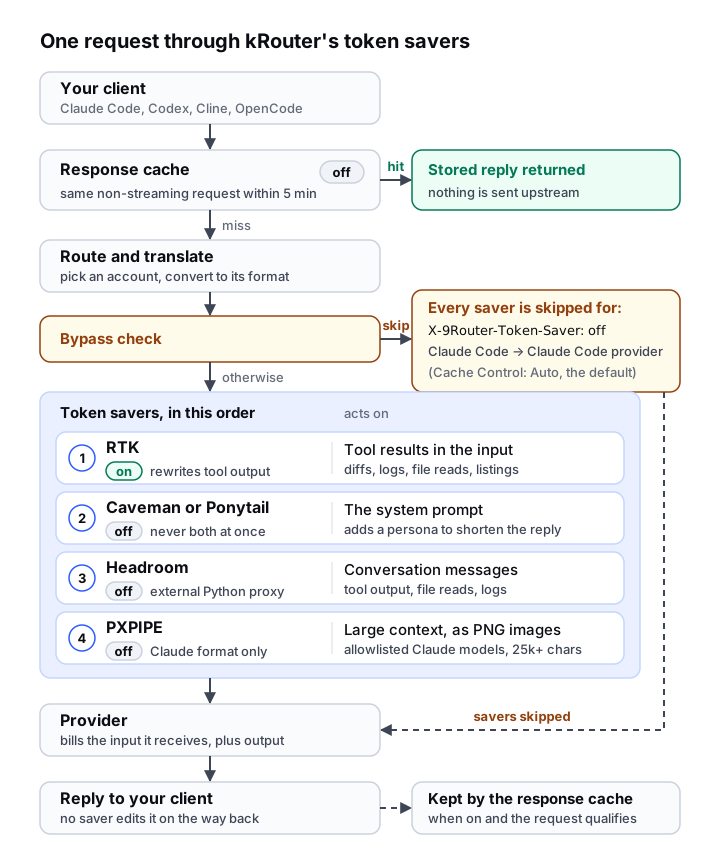
Three things in that picture matter more than any single saver.
The response cache comes first. It is checked before kRouter picks a model or an account. On a hit, nothing is sent upstream. On a miss, the request carries on and the reply is stored on its way back.
The other savers run late, in a fixed order. They act after the request has been routed and translated into the provider's format, so they edit what the provider actually receives: RTK, then Caveman or Ponytail, then Headroom, then PXPIPE. Each works on the previous one's output: Headroom compresses tool output that RTK has already trimmed, and PXPIPE images a system prompt that may already carry a persona.
Two cases skip all of them by default. A request carrying X-9Router-Token-Saver: off goes out as translated, and so does Claude Code talking to the Claude Code provider, because any edit would break Anthropic's prompt cache for that conversation. That second rule is the Auto setting of the Cache Control mode on the Settings page: Always preserve widens it to every request to the Claude Code provider or an Anthropic-compatible one, and Never preserve drops it. Neither case affects the response cache, which has already been checked.
Input or output
A provider bills two things: the input it receives (system prompt, tool definitions, the conversation so far, every tool result) and the output the model writes. In a coding agent, input dominates, because every turn resends everything before it. Why your Cline bill hit $200 walks through that loop.
RTK, Headroom and PXPIPE shrink input. Caveman and Ponytail add to it, about 960 characters for Caveman at its default level and about 1,570 for Ponytail on every request, in exchange for a shorter answer. The response cache saves both, but only for a request it has already seen.
Tool output: RTK
RTK reads each tool result in the request, recognises what produced it (a diff, a build log, a grep, a directory listing, a long file read) and swaps in a shorter version. It understands the tool-result shapes of the OpenAI, Claude, Responses, Gemini, Antigravity and Kiro formats, so it works whichever of those formats the request leaves in.
It cannot touch your prompt, the system prompt, earlier replies, tool results the client marks as errors, results under 500 characters, or tool output a client sends as ordinary message text. One provider falls outside it for a reason of kRouter's own making: the Cursor translator rewrites every tool result into ordinary user text, and RTK's pass runs after translation, so in v0.5.165 a Cursor request reaches the provider with its tool output whole. It is lossy on purpose: long hunks and lists are cut, and the model has to read again if it needs what was dropped. It is on from the first run. RTK token compression lists every filter.
The system prompt: Caveman or Ponytail
Caveman and Ponytail never remove anything. Each adds a persona to the system prompt your client already sends, or creates one if there is none. On Kiro, which has no system slot, it goes at the front of the current message. Caveman tells the model to answer tersely; Ponytail tells it to write the least code that works.
They act on input to change output, so they cost a little on every request, which only pays off when answers are long. They also cannot run together, because both claim every response and prescribe different shapes for it. If both are switched on, kRouter runs Ponytail, skips Caveman and logs a warning. On the Endpoint page, turning one on turns the other off.
How much they save depends on how much of your bill is output, which in agent work is usually little. Caveman vs Ponytail has the outside measurements and the choice between them.
The conversation: Headroom
Headroom is the one saver that is mostly someone else's software. kRouter posts the request's messages to a Headroom proxy (http://localhost:8787 by default) at its /v1/compress endpoint and puts the compressed messages back. The proxy is the headroom-ai Python package (Python 3.10 or newer), run locally or elsewhere, such as a Docker sidecar. The Token Saver page can start and stop a local proxy or point at a remote one.
The base [proxy] install reported 0% in kRouter's testing; the ml and code extras do the work, and the Token Saver page's setup box suggests only the base install. Add an extra yourself:
pip install "headroom-ai[proxy,ml]"Headroom's architecture documentation says what it leaves alone: your prompt text, system prompts, code unless AST compression is switched on, and the model's responses. It goes after bulk content: tool output, file reads, logs and search results. That overlaps with RTK, which runs first, so Headroom works on what RTK left.
kRouter sends it Chat Completions, Claude and Kiro requests, and Responses requests that hold only messages. A Responses request carrying tool calls, tool results or reasoning is skipped; for Codex on a Responses-format provider, that is every turn after the first tool call. Google-format requests (Gemini, Gemini CLI, Antigravity) are skipped too. kRouter waits about three seconds for the proxy and sends the request unchanged if the proxy is down, slow or missing. Headroom's README reports savings of 21% to 57% on the four agent scenarios it publishes, and says prose and already-dense output compress very little. The Headroom post covers kRouter's own measured run.
Context as images: PXPIPE
PXPIPE does not shorten text. It renders it as PNG images, because a provider bills an image by its pixel size, not by the text inside. kRouter hands the request to the pxpipe-proxy package, whose README says it images the system prompt, tool documentation and older bulk history, keeps recent turns as text, and never touches the model's output.
It is the narrowest saver. kRouter only passes it requests that:
- leave kRouter in Claude's Messages format
- are at least 25,000 characters long
- go to a model on kRouter's PXPIPE allowlist, which by default covers the Fable 5 models and the Claude 4 Opus, Sonnet and Haiku families. No Opus 5 or Sonnet 5 model is on it, so Opus 5.5 and Sonnet 5.5 requests go out as text.
As with every saver, Claude Code's traffic to the Claude Code provider is skipped by default. The package then decides for itself whether imaging pays.
It is lossy, and how lossy depends on the model. In the README's own table, Fable 5 read back 13 of 15 exact 12-character hex strings from imaged content, Fable 5.1 read back 6, and Claude Opus 4.8 none. A miss is a confident wrong value rather than an error. Keep it away from work that depends on exact IDs, hashes or secrets.
The one kRouter run on record, in the v0.5.112 release notes, used version 0.9.0 of the package to send a 123,634-character system prompt to Claude Opus 4.8. The provider billed 8,726 input tokens; kRouter's log estimated about 31,000 tokens for the same content sent as text. kRouter installs the package's latest release from npm into its data directory, runs it in its own process, and sends the request as text if imaging takes over 15 seconds.
As of v0.5.165 no dashboard control switches PXPIPE on or installs it; its page shows status, savings and logs behind a Refresh button, and the Token Saver page does not mention it. Turning it on takes a signed-in call to kRouter's settings API that sets pxpipeEnabled, plus one to its PXPIPE install endpoint. Treat it as experimental.
Whole repeats: the response cache
The response cache compresses nothing. When it is on, kRouter hashes the request (model, system prompt, conversation, temperature, max tokens, tools and response format). If an identical request got an answer within the cache's lifetime, five minutes by default, kRouter returns that answer without calling the provider.
It only applies to non-streaming requests with a temperature of 0.3 or lower, or none set, and never to Antigravity, Gemini or Gemini CLI. Coding agents mostly stream, so it rarely fires for them. It suits scripts, batch jobs, title generation and structured-output retries. It lives in memory, holds up to 500 entries, and the X-9Router-Token-Saver header does not bypass it. Duplicate AI replies explains how a cache like this can go wrong.
All six side by side
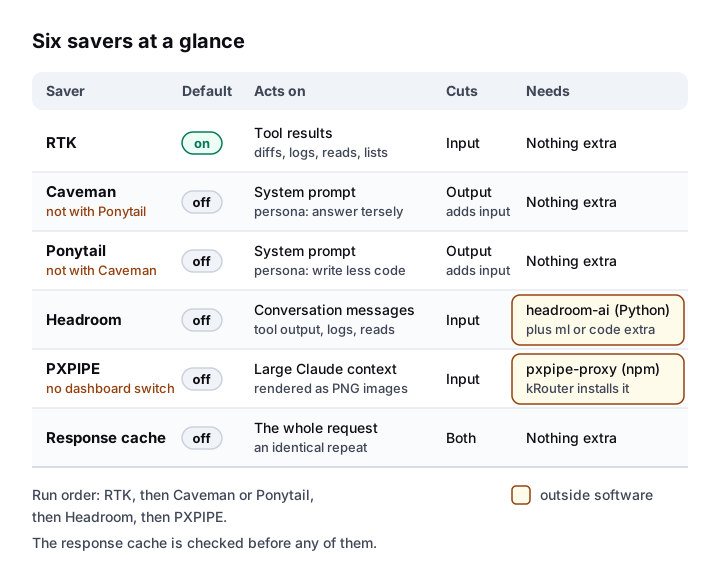
RTK is the only saver on by default, and it needs nothing. Headroom is the only one that runs as a separate program you install yourself. PXPIPE's package also comes from outside, but kRouter fetches it and runs it in-process.
Which ones to turn on
| Your traffic is mostly | Turn on | Why |
|---|---|---|
| Coding agent sessions | RTK (already on); Headroom for long sessions | Input dominates, and most of it is tool output and history |
| Claude-format traffic to a Fable 5 or Claude 4 model | PXPIPE, only if exact values do not matter | Narrow, lossy, and no dashboard switch |
| Chat, explanations, code review | Caveman | Most of the answer is prose |
| Feature work where the model over-builds | Ponytail, instead of Caveman | It cuts the code, not just the words |
| Scripts repeating identical non-streaming requests | Response cache | A hit costs nothing upstream |
| A plan billed per request, not per token | Only the response cache helps | The others shrink a request, but it is still one request |
RTK, Caveman, Ponytail and Headroom have switches on the dashboard's Token Saver page; RTK, Caveman, Ponytail and the response cache have them on the Endpoint page. Every setting is global, not per combo.
npm install -g @sifxprime/krouter
krouter -t
Common questions
Which kRouter token saver is on by default?
Only RTK. Caveman, Ponytail, Headroom, PXPIPE and the response cache all start off, so a fresh install compresses tool output in requests and nothing else.
Can I run all the token savers at once?
All but one pair. Caveman and Ponytail exclude each other: with both switched on, kRouter runs Ponytail and skips Caveman. RTK, Headroom, PXPIPE and the response cache can all run together, in a fixed order.
Do the token savers change the model's reply?
None of them edits the reply on its way back. Caveman and Ponytail change it indirectly, by instructing the model before it answers, and the response cache can return an earlier reply to an identical request.
Which savers need extra software?
Headroom needs the headroom-ai proxy running (Python 3.10 or newer), with its ml or code extra for real compression. PXPIPE needs the pxpipe-proxy npm package, which kRouter installs into its data directory when asked. The other four are built in.
Why did a saver not touch my request?
The usual reasons: the request carried X-9Router-Token-Saver: off; Claude Code was talking to the Claude Code provider; the saver does not handle that format (PXPIPE is Claude-format only, and Headroom skips Google formats and Responses requests with tool items); the model is not on PXPIPE's allowlist; a tool result was under 500 characters; the provider was Cursor, whose translator turns tool results into user text before RTK looks at them, so on v0.5.165 RTK finds nothing to trim there; or the Headroom proxy was not running.
Related
Published by Kodelyth, the team that builds kRouter. Posts are drafted with AI assistance and reviewed by a person before they go out. kRouter is free and MIT licensed.
Install kRouterRelated posts
- Save moneyOne token over the line: the long-context price cliffClaude Haiku 5.5 charges 5x above 100,000 prompt tokens, and cache reads count toward the line. Where each vendor's threshold sits, and how to stay under.
- Save moneyHeadroom: the token saver that reclaims your context windowkRouter's Headroom saver cut one code-heavy request by 92.4%. It needs a Python proxy with the ml or code extras, is off by default, and fails open.
- Save moneyThe cheapest LLMs for coding in 2026: real list pricesDeepSeek, GLM, MiniMax and Kimi priced from their own pages, flat-rate plans from $10, the free tiers still standing, and a combo that stacks them.
Relevant docs
- Token savers: RTK, Caveman, Ponytail, Headroom, PXPIPEFive ways kRouter can shrink a request before it reaches the provider. Only RTK is on by default. What each saver does, what it needs, and its limits.
- Combos & fallbackPut several models behind one name. kRouter falls back from one to the next, rotates them, or asks a panel of models and merges the answers.
- ProvidersConnect 95+ AI providers to kRouter: OAuth subscriptions, free services, free-tier and pay-per-token API keys, and browser-cookie logins.