kRouter combos, visually: fallback, round robin, fusion
A combo is one model name in front of a list of models. How fallback, round robin and fusion each use that list, drawn with worked examples.
Your coding tool has one model field. Put daily in it, and the answer comes from GLM, from DeepSeek or from your Claude Code subscription, depending on which of them can take the request right now. daily is a combo: a name you use in place of a model ID, with an ordered list of provider/model entries behind it.
Every combo strategy starts from that list. What changes is how many entries one request touches, and in what order: fallback tries them one at a time, round robin changes which one goes first, and fusion asks all of them at once and has a judge model write one answer. This post draws each one with a worked example, as of v0.5.166. Settings, the full error table and nesting rules are in the combos docs.
The example combo
Combo "daily"
  1. glm/glm-5.1            text only
  2. ds/deepseek-v4-pro     text only
  3. cc/claude-sonnet-4-6   reads images
"Text only" and "reads images" are what kRouter's own model table says. That table, not the provider, decides which entries can take an attachment.
Two layers share the routing. The combo picks a model. For each entry, kRouter then picks one of that provider's accounts and tries the provider's other accounts before the combo moves on. The account layer uses Zenith by default; see multiple accounts per provider. In the diagrams, one box is one entry with all of its accounts behind it.
The strategy is set on each combo's card on the Combos page. A card left on Fallback follows the global Combo Round Robin switch in the Routing Strategy section of Settings, so while that switch is on, a combo whose card says Fallback rotates as well.
Fallback: one entry at a time
Fallback is the default. Your list order is a preference, and kRouter adjusts it before every request, in two steps:
- Attachments. If your latest message carries an image, a PDF, audio or video, the entries that can read it move to the front. The rest keep their order behind them. This is a split, not a nudge: the two groups never mix again.
- Quota. Entries whose provider has reported remaining quota for that exact model move ahead of entries with no such figure, most left first. Antigravity and Gemini CLI report quota per model; Claude Code and GLM report time windows, and a plain API key such as DeepSeek reports nothing, so those entries keep their order among themselves. This step runs inside the split step 1 made: it orders the entries that can read your attachment among themselves, then the rest among themselves. A text-only entry with a quota figure can never get in front of the entry that reads your image. With no attachment there is no split, and quota orders the whole list.
Then kRouter walks the list. Each entry gets all of its accounts' attempts first. When they all fail with an error a different model might not hit, such as a rate limit or a server error, the next entry gets the request. If the model itself has disappeared upstream, kRouter first tries up to three related models from the same family. An error about the request's size comes straight back: a prompt too long for one model is treated as too long for all of them. A 4xx about anything else that no rule claims, such as a parameter this model will not accept, stops the account loop but not the combo: the next entry is a different model and may accept it.
An answer can count as a failure too. When a non-final entry replies 200 with nothing usable in it, kRouter moves on: no text, no tool call, no reasoning, and no finish reason saying the model was done. The last entry's reply is always passed on as it arrived, empty or not, and a streamed reply is never inspected this way.
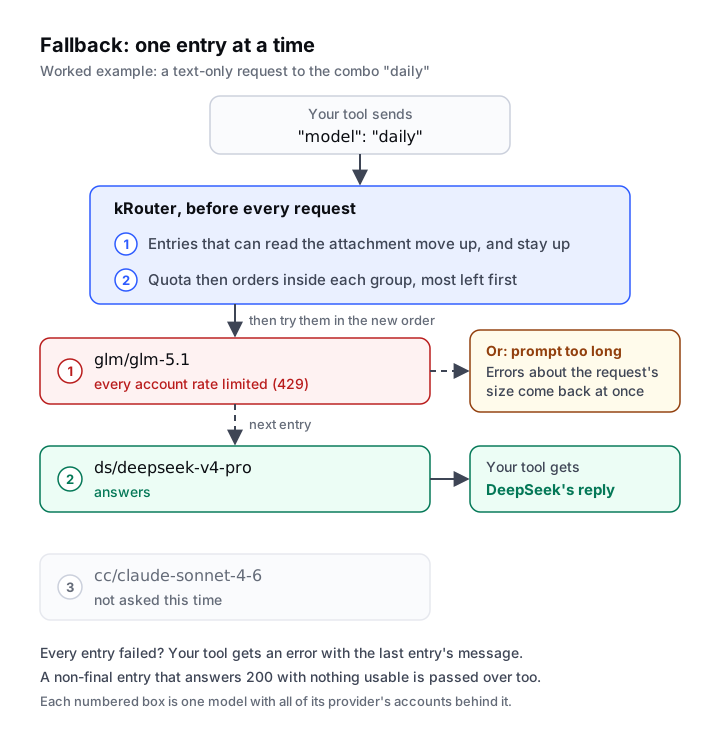
Neither reorder step changes anything in the diagram: there is no attachment, so there is no split, and none of the three entries reports per-model quota, so GLM goes first. Your tool sees one ordinary reply, from DeepSeek.
Attach a screenshot to the next message and step 1 moves cc/claude-sonnet-4-6 to the front, as the only entry here that reads images, and step 2 cannot move it back. Had no entry been able to read it, kRouter would have put a model from the Vision Adapter's pool in front instead. The adapter is on by default for images, but its pool starts empty, so until you put a model in it the adapter adds nothing. The request then goes to a text-only entry, which rejects the image once; kRouter learns that, drops the image and retries, and the answer comes back written without it. Screenshots on text-only models explains why you should add one.
When every entry fails, your tool gets an error carrying the last entry's message. kRouter's log (krouter -l, or the Console Log page) shows each step, including Capacity auto-switch or Quota auto-switch when a reordering changed which entry goes first.
Round robin: the first entry takes turns
Round robin changes one thing: which entry goes first. The list is rotated, so with entries A, B and C, one request tries A, B, C, the next B, C, A, and so on. Failures still fall through to the entries behind, in the rotated order, and the attachment split and the quota ordering from fallback still run after the rotation.
How many requests an entry keeps the front spot is the Combo Sticky Limit. It defaults to 1, which moves on after every request. The field sits under the Combo Round Robin switch in Settings and only appears while that switch is on, but its number applies to every round-robin combo, including those set to Round Robin on their own cards.
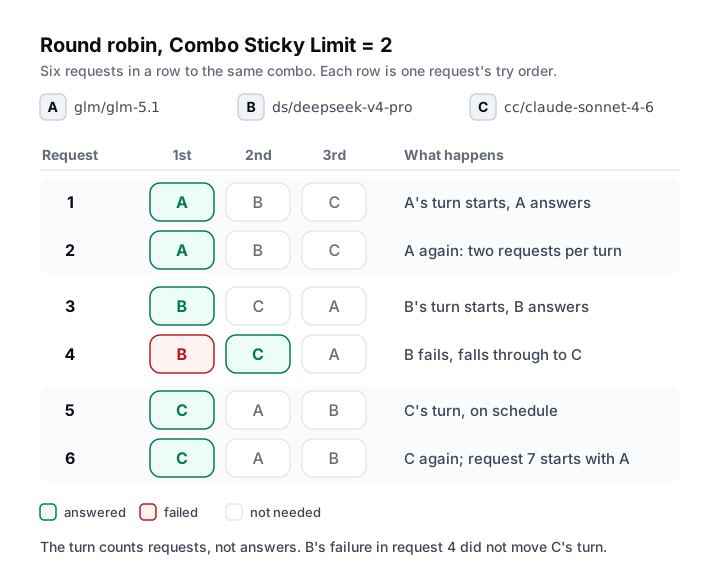
The diagram uses the same three entries. On request 4, B fails and C answers, yet request 5 still starts with C, on schedule. The turn counts requests, not answers: the rotation moves on before the request is sent, whatever then happens to it.
There is one rotation per combo, shared by every tool and conversation that calls it, so two agents using daily at once each see only part of the sequence. It lives in memory: restarting kRouter, or saving any combo strategy setting, starts every round-robin combo again from its first entry, and editing a combo restarts that one.
Round robin here rotates models. Rotating one provider's accounts is a separate setting with its own sticky limit: the Strategy menu in the same Settings card, or the Round Robin toggle on a provider's page. Because consecutive requests can land on different models, an agent session switches models between steps, and a different provider never holds the previous one's prompt cache. Round robin earns its place when you want to spread load, for example across free tiers that each run out on their own; the OpenRouter free tier post builds that setup inside a fallback combo with a paid entry last.
Fusion: ask every entry, then one model writes the answer
Fusion is the strategy that uses several entries per request on purpose. It applies to chat requests; a fusion combo used for text to speech, images, search or fetch is run like fallback.
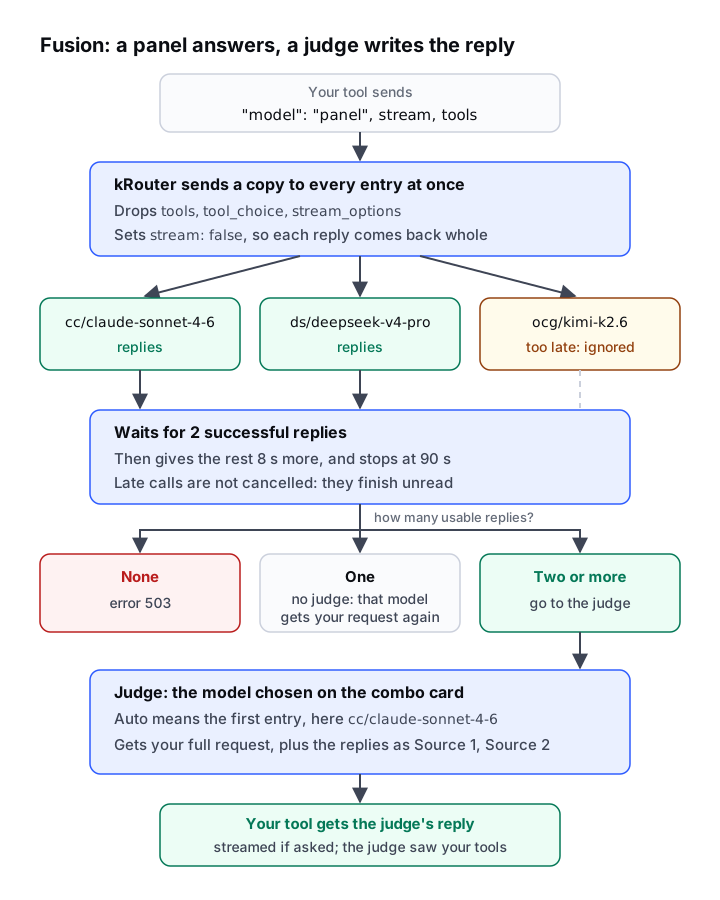
Here is what happens to one request sent to a combo called panel with three entries:
- Fan-out. kRouter sends a copy of the request to every entry at the same time. Each copy has
tools,tool_choiceandstream_optionsremoved andstreamset to false, so the panel answers in plain text and each reply arrives complete. The attachment and quota steps do not run, and neither does the Vision Adapter: every entry is asked, whatever it can read. - Quorum. As soon as two entries have answered successfully, the rest get 8 more seconds. At 90 seconds kRouter stops waiting regardless. In the diagram,
ocg/kimi-k2.6misses the window and its reply is ignored. Late calls are not cancelled: they run to the end and still use that provider's quota or credit; kRouter just never reads them. Empty replies are dropped too. - Judge. With two or more usable replies, kRouter calls the judge: the model picked under Judge on the combo's card or, on Auto, the first entry. The judge gets your whole original request, tools and stream setting intact, plus one extra user message. It holds the replies labelled Source 1, Source 2 and so on, without model names, and tells the judge to weigh where they agree, disagree and fall short, then write one answer without mentioning the panel.
Your tool gets the judge's reply in its own format, streamed if it asked. The response carries no marker of the panel; kRouter's log shows a FUSION line for each step.
Two cases skip the judge. With no usable reply, your tool gets a 503 error. With exactly one, kRouter sends your original request, tools and streaming included, to that model again and returns its reply. The judge can fail too: it falls back across its own accounts but not to other entries. The judge picker lists combos as well as models, so a fallback combo there gives the final step a backup.
The costs follow from that shape. One fusion request makes a call to every entry plus one to the judge, and on Auto the first entry is called twice. Nothing reaches your tool until the panel round is over, so even a streamed reply starts only after that. Fusion suits a hard question you ask once, such as a design review or a stubborn bug. It suits an agent loop poorly: every step pays for the whole panel, and the panel cannot call tools, so when the right next step is a tool call, only the judge can make it.
Which strategy for which job
| Job | Strategy | Why |
|---|---|---|
| Keep a coding agent working when a subscription or key runs out | Fallback | One model per request; the next entry only when the current one fails |
| Spread requests across free tiers that each run out | Round robin, as the first entry of a fallback combo whose last entry is paid | Each tier takes a share, and the paid entry catches what they cannot |
| A hard one-off question where a second opinion is worth paying for | Fusion | Several models answer and a judge reconciles them |
| Long agent sessions with tool calls | Fallback | Fusion multiplies every step and keeps tools from the panel; round robin changes model between steps |
| Mostly text, sometimes a screenshot | Fallback with one entry that reads images | The attachment step moves that entry forward only when needed, and quota cannot move it back |
Common questions
Does a combo also pick the account?
No. A combo picks the model. For each entry, kRouter's account selection (Zenith by default) picks which of that provider's accounts serves it, and tries the others before the combo moves to its next entry.
Why does my round-robin combo keep starting with the same model?
First check that it rotates at all: a card set to Fallback rotates only while the global Combo Round Robin switch is on. If it does, a Combo Sticky Limit above 1 keeps each entry in front for several requests. An entry whose provider reports quota for that exact model, such as Antigravity, is moved ahead of entries without a figure after the rotation, on every request. An image splits the list and keeps the entries that can read it in front, with quota only reordering inside each group. And a restart, or saving a strategy setting, starts the rotation over.
My combo answered with nothing at all. Why did it not try the next entry?
It does, from any entry but the last. An earlier entry that replies 200 with no text, no tool call and no reasoning, and without a finish reason saying it was done, is treated as no answer and the combo moves on. The last entry's reply is yours as it arrived, empty or not. A streamed reply is never inspected this way, so an entry that streams an empty answer counts as a success wherever it sits.
Can the fusion panel use tools?
No. kRouter removes tools from the copies it sends to the panel. The judge's call keeps your original tools, so the final reply can still contain a tool call.
What happens if only one fusion entry answers?
kRouter skips the judge, sends your original request to that model again and returns its reply. If no entry answers, your tool gets a 503 error.
Related
Published by Kodelyth, the team that builds kRouter. Posts are drafted with AI assistance and reviewed by a person before they go out. kRouter is free and MIT licensed.
Install kRouterRelated posts
- How kRouter worksHow a gateway leaks the keys it holdsFour ways an LLM gateway hands out the keys it stores, the October 2026 LiteLLM CVEs behind each one, and the kRouter releases that fixed the same shapes.
- How kRouter worksClaude Cowork with other models: third-party inference setupClaude Desktop can run Cowork through any Messages API gateway. Setting it up with kRouter, what the app assumes about your models, and what you give up.
- How kRouter worksKilo Code codebase indexing: picking an embedding providerWhat Kilo's indexer sends, which embedding model to use for code, why changing it means a full re-index, and how to route it all through one endpoint.
Relevant docs
- Core conceptsProviders, combos, account routing, token savers, MITM mode, quota tracking, the response cache and remote access: the eight ideas behind kRouter.
- The Zenith Routing EngineHow kRouter picks which of your accounts serves a request: Zenith scoring, conversation stickiness, cooldowns, and the round-robin, P2C and random options.
- Token savers: RTK, Caveman, Ponytail, Headroom, PXPIPEFive ways kRouter can shrink a request before it reaches the provider. Only RTK is on by default. What each saver does, what it needs, and its limits.